Softera logo

Softera.Bankfeed – automated payment processing

Softera.Bankfeed is designed for companies that require accurate and up-to-date payment data within Microsoft Dynamics 365 Business Central. Eliminate manual work by automating bank data retrieval, payment recognition, and reconciliation with invoices.

Sužinokite daugiau

Arrow
Hero image

The difference you’ll notice immediately

corner corner

Manual processing of bank transactions is often an invisible yet time-consuming part of daily accounting work. Softera.Bankfeed automates this process, allowing finance teams to focus on higher-value activities.

Without Softera.Bankfeed

  • Manual import

    Bank statements are exported manually and uploaded into Business Central.

  • Risk of errors

    Duplicate data, missed transactions, or incorrect matching may occur.

  • Limited cash flow visibility

    Payment data, outstanding balances, and bank positions are only visible once entered manually.

  • Repetitive tasks

    A significant share of work adds limited value but requires continuous time and attention.

With Softera.Bankfeed

  • check

    Automated bank data retrieval

    Statements are automatically imported into Business Central based on a defined schedule.

  • check

    Accurate payment recognition

    The system identifies customers, vendors, amounts, documents, and invoices with high accuracy.

  • check

    Real-time data

    Bank balances and incoming payments are updated automatically and regularly.

  • check

    More time for value-added work

    Finance teams can focus on process improvement and reporting instead of manual tasks.

Softera.Bankfeed functionality

Automated bank statement import

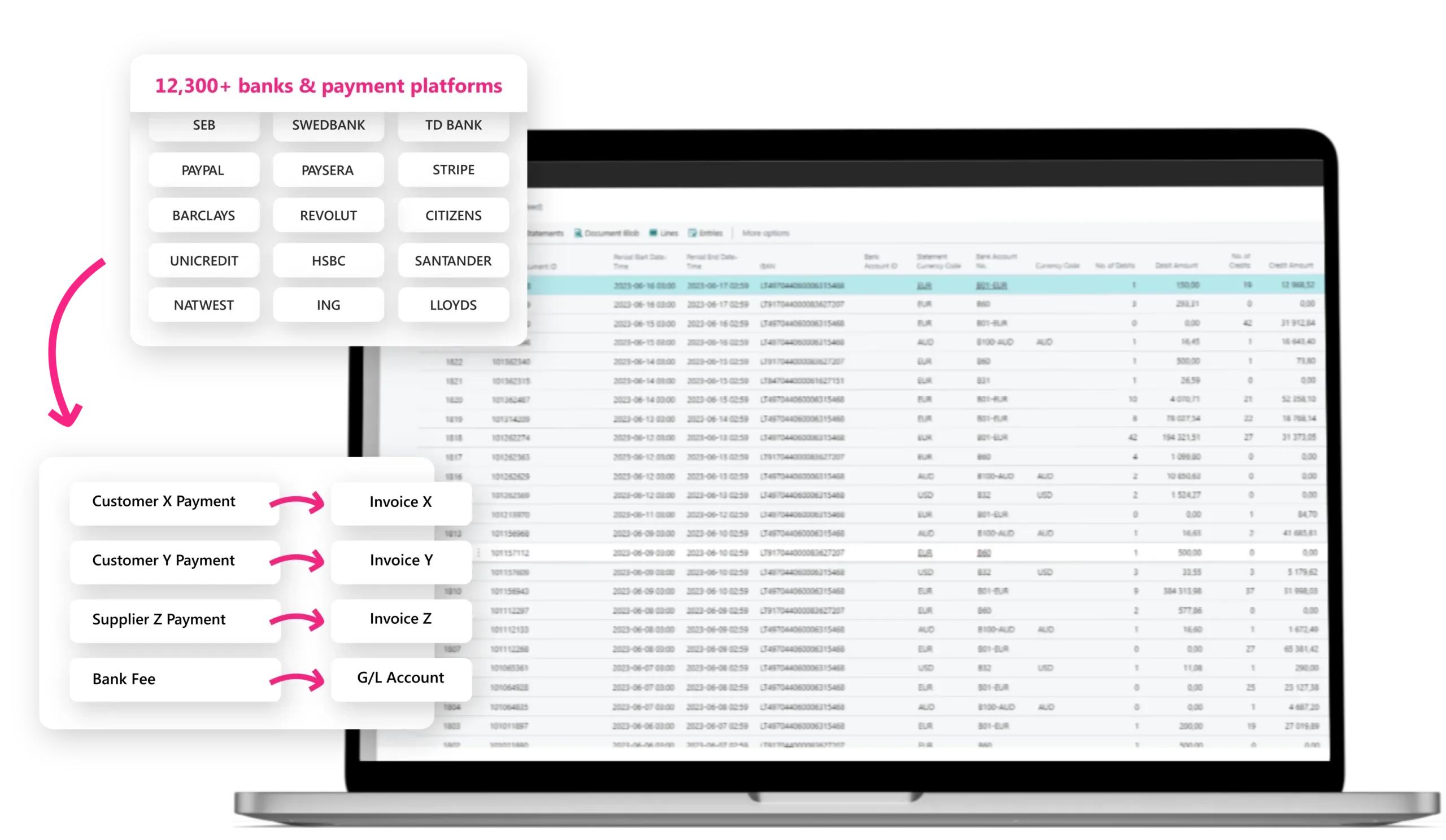
Softera.Bankfeed integrates with more than 12,300 banks and payment platforms, automatically importing transactions into Business Central.

Payment recognition

Payment recognition
Before reconciliation, the solution identifies customers, vendors, amounts, documents, and invoices using configurable recognition rules tailored to business needs.

Payment reconciliation
Payments are automatically matched with registered invoices. Automatic posting can also be configured to further reduce manual effort.

Payments are automatically matched with registered invoices. Automatic posting can also be configured to further reduce manual effort.

Payment export

The solution enables single and bulk payment initiation directly from the ERP system. Payment data is transferred to the bank and confirmed by an authorized user, ensuring control and accuracy.

Real-time bank balances

Users can monitor bank account balances in real time within Business Central, improving cash flow visibility.

Transaction traceability

Each payment is clearly linked to accounting records and documents, enabling full visibility into payment status and related data.

Pricing tailored to your business needs

Number of accounts

1-3
4-10
11-20
21-30
31-100
101+

Outgoing payments

Single or bulk payment initiation

200 payment orders

Price per account

45 €
35 €
25 €
20 €
15 €
10 €

Outgoing payments

Single or bulk payment initiation

38 €

Total price

45 € – 135 €
170 € – 380 €
405 € – 630 €
650 € – 830 €
845 € – 1880 €

Outgoing payments

Single or bulk payment initiation

€0.20 for each additional payment
 Quote Icon corner corner

Quick check – is it time to automate payment processing?

Review your current situation.
If at least one of these points applies, it’s worth discussing Softera.Bankfeed.

Compatibility and implementation

Fully compatible with the latest versions of Microsoft Dynamics 365 Business Central. Implementation is fast and straightforward—from a few minutes to a couple of hours. The solution is operational immediately after setup, with full support from our team.

What to know
before getting started

The monthly fee starts from €45/month and depends on the number of connected bank accounts. More details and the pricing calculator are available here. Pricing is calculated per Business Central production environment.

If you are an accounting firm, please contact hello@bankfeed.com for tailored pricing.

Softera.Bankfeed enables automatic import of bank statements from all European banks operating under the open banking framework.
Clients in Lithuania and internationally already use the solution with banks and payment platforms such as SEB, Swedbank, Luminor, Citadele, Medicinos bankas, Stripe, Revolut, Paysera, Santander, and others.

Bank transactions are automatically imported into Microsoft Dynamics 365 Business Central, where payment journal entries are created. Incoming transactions are then automatically and accurately matched with issued invoices through customer, vendor, and document recognition, ensuring reliable and consistent reconciliation.
Depending on the configuration, transactions are matched either automatically or manually. Incoming payments are accurately reconciled with issued invoices through customer, vendor, and document recognition. Any unmatched entries remain in the payment journals for user review and can be reconciled manually.

Using configurable recognition rules, Softera.Bankfeed automatically identifies matching data points.
When a match is found—such as customer number, invoice number, payment reference, or amount—the system links the payment to the corresponding invoice and proceeds to process the next transaction line, ensuring efficient handling of the entire bank statement.

Recognition results depend heavily on proper product settings and the quality of transaction data received from the bank. Typically, Softera.Bankfeed achieves at least a 95% recognition rate.
Each posting of a received transaction, whether recognized by Softera.Bankfeed or by the user, allows the recognition mechanism to continuously improve and enhance future recognition results. The accumulated posting history is used when receiving and recognizing future bank transactions.

To install the Softera.Bankfeed solution and start using the 1-month free trial, click the “Free Trial” button on Microsoft AppSource.

Using the materials provided below, you can install and start using the solution independently in just a few hours:

  • Setup wizard for general parameters and bank connection – video tutorial available HERE
  • Wizard to familiarize yourself with Softera.Bankfeed fields, pages, and functions – video tutorial available HERE
  • Detailed user instructions are available HERE
  • Clients typically contact us for assistance with payment recognition and invoice reconciliation setup. If you need such assistance, please contact us at support@bankfeed.com.

The solution enables automatic import of payment information from platforms such as Kevin, Klarna, Paysera, PayPal, Stripe, Wise, ConnectPay, Soldo, Skrill, and others.

Expand your capabilities
with Microsoft Business Central 365